> ## Documentation Index
> Fetch the complete documentation index at: https://docs.databar.ai/llms.txt
> Use this file to discover all available pages before exploring further.
# Table lookup
> Pull matching values from another table, like VLOOKUP in a spreadsheet.
Table Lookup lets you enrich any table by pulling in matching values from another table in your workspace. Think of it as VLOOKUP built natively into Databar: no formulas, no exports, no manual copy-pasting between sheets.
Table Lookup is found under **Enrich** → **Formulas & Tools**. It uses your existing Databar tables as the lookup source.
## How to use
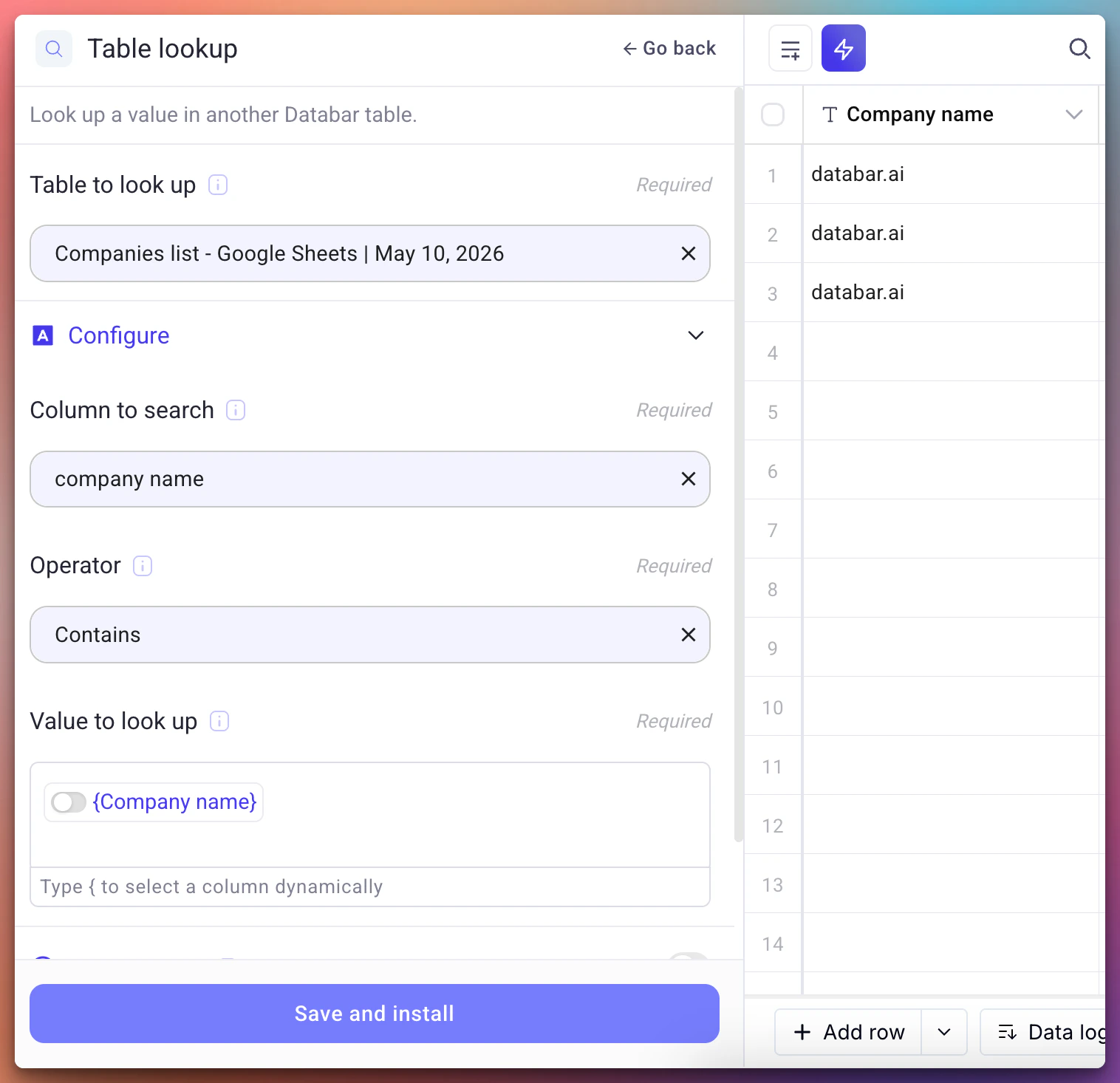
Click **Enrich**, then select **Formulas & Tools**. Choose **Table Lookup** from the list.
Choose which table in your workspace contains the data you want to pull in.
Select which column in the target table should be searched for matches.
Choose how values should be compared:
* **Contains**: partial match (useful for names, domains)
* **Equals**: exact match (useful for IDs, emails)
Define which value from your current table to look up. You can use dynamic column references with the `{column_name}` syntax.
The matched result from the target table lands as a new column in your current table.
 ## Use cases
| Scenario | How it helps |
| ---------------------------------- | ------------------------------------------------------------------- |
| Cross-referencing CRM exports | Match contacts across a marketing list and a CRM export by email |
| Combining enriched data | Pull company details from one enriched table into another by domain |
| Excluding competitors | Look up a blocklist table and flag matches for removal |
| Joining datasets on a shared field | Connect any two tables that share a common identifier |
## Dynamic column references
When mapping the lookup value, use curly braces to reference columns dynamically:
```
{Email}
{Company Domain}
```
This pulls the value from the specified column for each row, just like a formula reference.
## Related
Learn about all available enrichment options.
Learn how tables work in Databar.
## Use cases
| Scenario | How it helps |
| ---------------------------------- | ------------------------------------------------------------------- |
| Cross-referencing CRM exports | Match contacts across a marketing list and a CRM export by email |
| Combining enriched data | Pull company details from one enriched table into another by domain |
| Excluding competitors | Look up a blocklist table and flag matches for removal |
| Joining datasets on a shared field | Connect any two tables that share a common identifier |
## Dynamic column references
When mapping the lookup value, use curly braces to reference columns dynamically:
```
{Email}
{Company Domain}
```
This pulls the value from the specified column for each row, just like a formula reference.
## Related
Learn about all available enrichment options.
Learn how tables work in Databar.