

 MCP Server
AI Prompt enrichments
An AI Prompt enrichment runs a custom prompt on every row in your table. Reference column values using the{ syntax so the prompt adapts to each row’s data.
Example: You have a table of company names and descriptions. Add an AI Prompt enrichment with the instruction:
1
Open the enrichment panel
Click Enrich in the table toolbar and search for AI Prompt.
2
Write or generate your prompt
Enter your instruction in the prompt editor. Use
{ to insert column references wherever you need row-specific data.3
Configure output columns
Select which response fields to add to your table.
4
Run the enrichment
Click Run to process rows. Start with a single row to validate the output.
AI Prompt Generator
Not sure how to phrase your prompt? Describe what you want in plain English and Databar will generate a well-structured prompt for you. The generator works for both AI Prompt enrichments and AI Researcher agents.1
Open the generator
In the prompt editor, click Generate prompt.
2
Describe your goal
Write a short description of what you want the AI to do. For example, “Summarize each company’s value proposition in one sentence.”
3
Review and edit
The generator produces a prompt with proper structure and column references. Edit it further if needed, then apply it to your enrichment.
AI Prompt Templates
Save any prompt as a workspace-wide template so you and your team can reuse it across tables without rewriting it each time. Templates are ideal for prompts you run regularly: lead qualification, content classification, data extraction patterns, and more.Saving a template
After writing or generating a prompt, click Save as template, give it a name, and it becomes available across your entire workspace.Using a template
When setting up an AI Prompt enrichment or AI Researcher, click Templates to browse your saved prompts. Select one, and the prompt editor is pre-filled with the template content. Adjust column references as needed for the current table.Required vs. optional column references
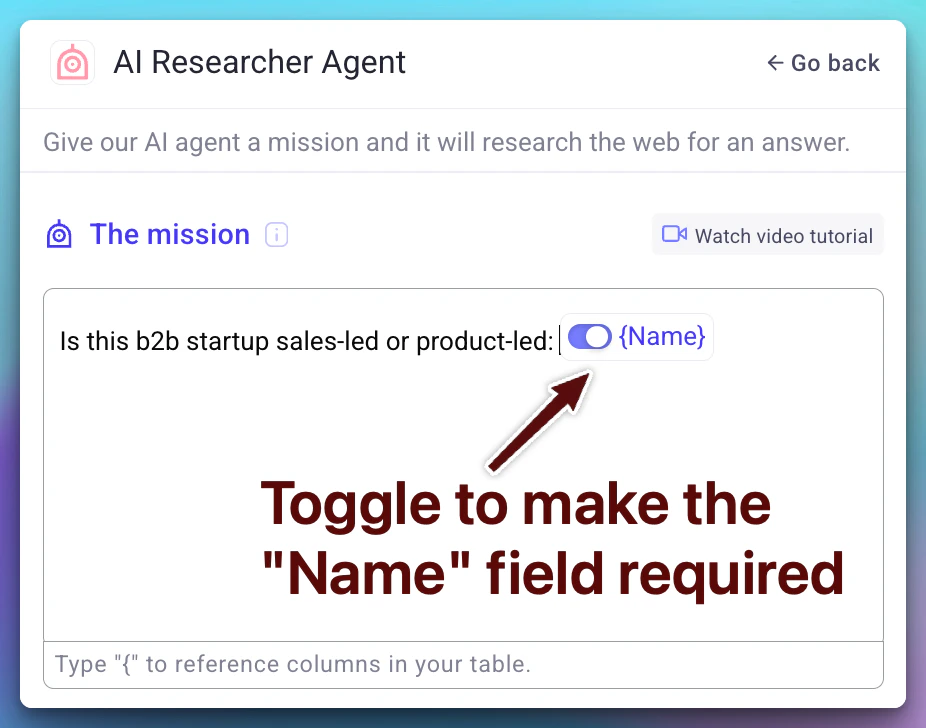
When your prompt includes column references, each reference can be toggled between required and optional:
Use the toggle next to each column reference in the prompt editor to set its requirement level.
Next steps
AI Researcher
Use AI agents to visit websites and extract structured data.
Enrichments
Learn how to add and manage enrichments on your tables.
Credits and billing
Understand how AI prompt runs are billed.