

 MCP Server
How it works
The AI Researcher takes two inputs:- A prompt: a natural-language description of what you want to extract (e.g., “Find the pricing model and list each tier”).
- A column of URLs: the websites the agent should visit.
Example use cases
Setting up an AI Researcher enrichment
1
Open the enrichment panel
Click Enrich in the table toolbar, then search for AI Researcher in the enrichment catalog or click the AI Researcher button directly.
2
Write your prompt
Describe what you want the agent to extract. Be specific. The clearer the prompt, the better the output. You can reference column values using the
{ syntax to make prompts dynamic per row.3
Configure output fields
Choose which response fields to add as columns in your table. You can optionally remove the result and reasoning fields if you only need the extracted data.
4
Run the enrichment
Hit Run to process your rows. Start with a single row to verify the output before running the full table.
Customizable outputs
By default, the AI Researcher returns a result field and a reasoning field that explains how the agent arrived at its answer. Both fields are now fully optional. Remove either one during setup if you only need the raw extracted data.Required column references
When your prompt references columns with the{ syntax, you can mark each reference as required or optional. If a required column value is empty for a given row, the enrichment skips that row entirely. This prevents unnecessary executions and avoids sending incomplete inputs to the AI model.
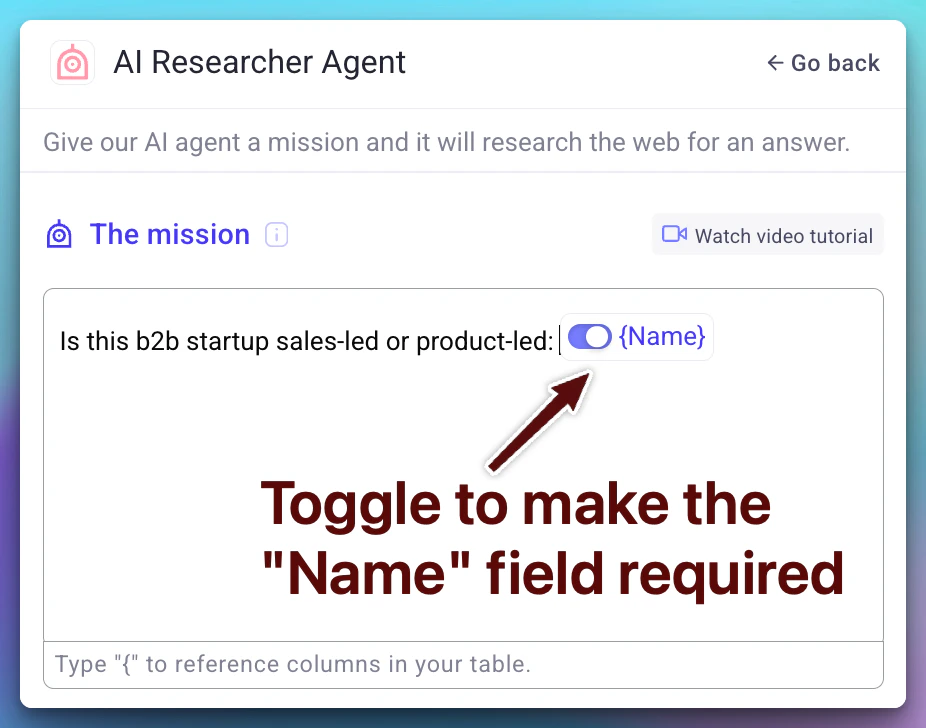
Marking references as required is especially useful when running the AI Researcher on large tables where some rows may have missing URLs or context fields.
AI models
Databar uses the latest AI models to power the AI Researcher, ensuring high-quality extraction and reliable structured outputs. Model updates are applied automatically. No configuration needed on your end.Tips for better results
- Be specific in your prompt. Instead of “Get info about the company,” try “Extract the founding year, headquarters city, and number of employees.”
- Test on a single row first. Verify the output format before committing to a full run.
- Use the AI Prompt Generator. Describe what you want in plain English and let Databar generate a well-structured prompt for you. See AI prompts.
- Combine with other enrichments. Use the AI Researcher to extract URLs or identifiers, then chain additional enrichments for deeper data.
FAQ
Does Databar support adding your own API key for AI Researcher?
Does Databar support adding your own API key for AI Researcher?
No, AI Researcher currently runs on Databar’s managed AI infrastructure. You cannot bring your own API key. However, AI Researcher is priced very competitively, so the cost per run is kept low.
Can I customize the outputs?
Can I customize the outputs?
Yes. You can choose which response fields to include as columns during setup. The default result and reasoning fields are both optional, so you can remove either one if you only need the raw extracted data. You can also shape the output format through your prompt (e.g., asking for JSON, bullet points, or specific fields).
Next steps
AI prompts
Generate, save, and reuse prompt templates across your workspace.
Enrichments
Learn how enrichments work and how to manage them.
Tables overview
Understand how tables, columns, and rows fit together.
Credits and billing
See how AI Researcher runs are billed.